Follow a value
Where an input, secret or output goes and where it comes from, across reusable workflows and actions, on the command line and in the editor.
A value can pass through several files before it is used: a caller's matrix, a reusable workflow's input, an action's
input, and then a script or an if:. flowpact trace follows it in either direction, all the way, and the editor
shows each step as you hover. The examples on this page run on flowpact's
fixtures.
Where does this value go?
npx flowpact trace pipeline.yml:environment.github/workflows/pipeline.yml#inputs.environment:5:7 (input)
└── ▶ .github/workflows/build.yml#inputs.environment:5:7 (input)
via ${{ inputs.environment }} @ .github/workflows/pipeline.yml:23:24
└── ▶ .github/workflows/package.yml#inputs.environment:5:7 (input)
via ${{ inputs.environment }} @ .github/workflows/build.yml:31:24
└── ▶ .github/workflows/publish.yml#inputs.environment:5:7 (input)
via ${{ inputs.environment }} @ .github/workflows/package.yml:27:24
└── job setting in jobs.upload › environment .github/workflows/publish.yml:24:22
${{ inputs.environment }}Each ▶ is an input, secret or output the value is passed on to, and via is the expression that passes it, at the
line that does. The trace ends where the value is used: here a job's environment:, three reusable workflows down.
Elsewhere it ends at a script (run script), a condition (condition) or an action's input.
Where does it come from?
--up follows a value back to where it starts. In the
incident-matrix fixture, a test suite's
config input comes from a matrix:
npx flowpact trace run-suite.yml:config --up.github/workflows/run-suite.yml#inputs.config:11:7 (input)
└── ◀ .github/workflows/tests.yml#jobs.run.matrix.config:15:13 (matrix)
via ${{ matrix.config }} @ .github/workflows/tests.yml:23:19
├── value in { name: linux } .github/workflows/tests.yml:12:7
│ "ci-linux.json"
├── value in { name: macos } .github/workflows/tests.yml:12:7
│ "ci-macos.json"
└── missing in { name: windows } .github/workflows/tests.yml:12:7
(undefined → '')The windows combination does not define config, so the input is empty there. Downstream, the same input decides
whether the tests run at all:
$ npx flowpact trace run-suite.yml:config
.github/workflows/run-suite.yml#inputs.config:11:7 (input)
├── condition in jobs.test › if  .github/workflows/run-suite.yml:17:9
│   inputs.config != ''
└── run script in jobs.test › steps[1] › run  .github/workflows/run-suite.yml:21:107
    ./run-tests.sh --suite "${{ inputs.suite }}" --variant "${{ inputs.variant }}...
On windows the job is skipped, and the run stays green. flowpact lint reports it as
FP401; the trace shows why.
Each branch upstream ends at what the value is: a literal, an input a caller leaves out (omitted, with the default
GitHub then uses), a matrix value or a missing one, or a context flowpact does not follow. The
flowpact trace reference lists them all, with inputs' defaults, dispatch inputs and
toJSON(inputs).
Where outside data enters
A context leaf is where a value enters from outside the files: the event (github.event.pull_request.title), the
runner, a step's outcome, or an env variable a script sets at run time. Here a reusable workflow's input carries a
pull request's title, text its author controls, while another caller passes its own input and the branch or tag it runs
on:
$ flowpact trace notify.yml:message --up
.github/workflows/notify.yml#inputs.message:4:7 (input)
├── ◀ .github/workflows/release.yml#inputs.version:4:7 (input)
│   via Released ${{ inputs.version }} from ${{ github.ref_name }}  @ .github/workflows/release.yml:9:29
├── context in .github/workflows/pr.yml › jobs.notify  .github/workflows/pr.yml:6:20
│   github.event.pull_request.title
└── context in .github/workflows/release.yml › jobs.notify  .github/workflows/release.yml:9:56
    github.ref_name
flowpact does not judge whether such a value is safe where it is used. zizmor
reports expressions expanded into scripts (template injection); pass them through env: instead.
Name a value
| Query | Matches |
|---|---|
ci.yml:env | the inputs, secrets or outputs named env |
ci.yml | the whole interface of the workflow: every input, secret and output |
ci.yml#inputs.env | that input, by file name |
.github/workflows/ci.yml#inputs.env | that input, by path |
setup:token | an input of the local action in .github/actions/setup |
A symbol is shown once per trace: when the value reaches it again by another path, the tree says ↑ shown above.
--depth n stops after n levels (12 by default).
In the editor
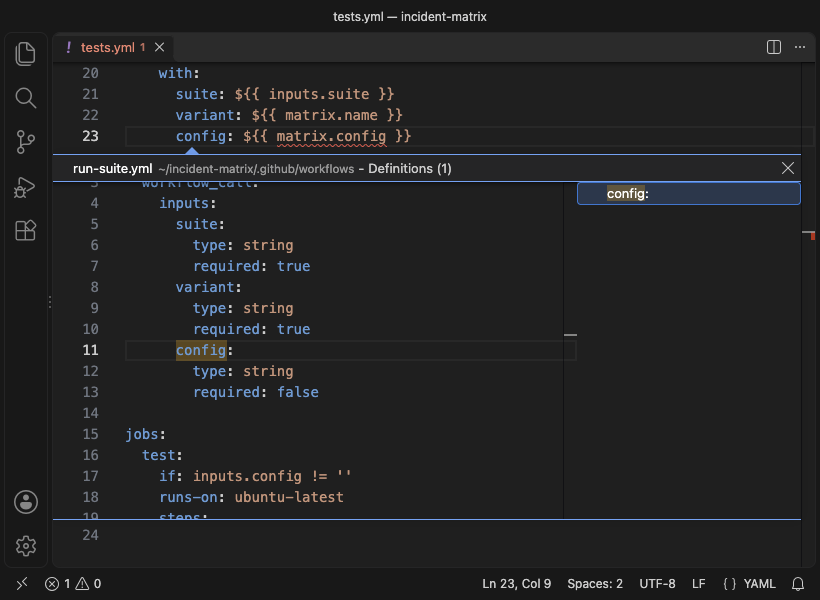
The editor extension shows the same flow one step at a time. Hover an input, secret, output, env
variable or matrix key for where its value comes from and where it goes; go to definition jumps from a caller's
with: key to the callee's input, or from needs.build.outputs.url to the output; Find All References lists every
read and every caller that passes it.
Which workflows call which
npx flowpact graphPipeline (.github/workflows/pipeline.yml) · on: workflow_dispatch
└── jobs.build (inherit) → Build (.github/workflows/build.yml)
└── jobs.package → Package (.github/workflows/package.yml)
└── jobs.publish → Publish (.github/workflows/publish.yml)(inherit) marks a call with secrets: inherit, and ×N one that fans out over N matrix combinations.
--format mermaid draws the same graph as a diagram GitHub renders in Markdown, issues and pull requests:
dot and json are for other tools (flowpact graph).
In scripts
--format json prints the traces for tools, and the API has trace() and
graph() for programs.
How values are followed
When a caller or step omits an input, its default: is the value there, so the trace also ends at the default (its
leaves come after the callers' leaves; the symbols it reads are ◀ branches, which come first): a literal for a
plain default, or what an expression default reads, at
<action> › inputs.<name>.default (<workflow> › on.workflow_call.inputs.<name>.default in a reusable workflow).
GitHub evaluates a default with a few contexts only:
- a reusable workflow's input:
github,inputsandvars. The default applies when the workflow is called, so theworkflow_callinputs and the variables it names (inputs.<name>,vars.<NAME>) are followed as◀branches, noted(the default of inputs.<name>); a wholeinputs(toJSON(inputs)) is a branch for eachworkflow_callinput. An input declared only underworkflow_dispatch(or nowhere) is empty there, a wholevars(vars.*) names no single variable, andgithubis the caller's, sogithub.event.inputs.<name>is not the workflow's own input: each is acontextleaf; - an action's input: the calling job's
github,strategy,matrix,jobandrunner, each acontextleaf. It may also callhashFiles(), which reads no context:${{ hashFiles('**/package-lock.json') }}alone ends at anexpressionleaf.
Any other context in a default (env, secrets, steps, needs, or an action's inputs and vars) is an invalid
leaf, as is a status function such as success(), or hashFiles() in a reusable workflow's default. A default that no
caller falls back to is not shown, nor is the default of a required reusable-workflow input: GitHub fails the run when
a caller omits it (FP101).
Here a local action's token defaults to github.token, and neither step that uses the action passes it:
$ flowpact trace setup:token --up
.github/actions/setup#inputs.token  .github/actions/setup/action.yml:4:3 (input)
├── omitted in .github/workflows/ci.yml › jobs.build › steps[1]  .github/workflows/ci.yml:8:15
│   (not passed)
├── omitted in .github/workflows/ci.yml › jobs.test › steps[1]  .github/workflows/ci.yml:13:15
│   (not passed)
└── context in .github/actions/setup › inputs.token.default  .github/actions/setup/action.yml:4:65
    github.token
A workflow that can be both called and dispatched holds an input in github.event.inputs.<name> only when it is
dispatched. When it is called, GitHub gives it the caller's github context, so github.event.inputs is the caller's
event, never what the caller passes in with:. Upstream, such a read shows the input as a branch noted
(when dispatched), with nothing traced under it, next to a context leaf for the called case; downstream, an input
reached through a caller's with: does not go on through its github.event.inputs reads. The same holds for a whole or
computed github (toJSON(github), github.event[x]), which reads every dispatch input, and for the step's own env:
values that read github. Read it as inputs.<name>, which holds the value in both cases. Here release.yml calls
deploy.yml with environment: production, a value that never reaches the action:
$ flowpact trace ship:environment --up
.github/actions/ship#inputs.environment  .github/actions/ship/action.yml:4:3 (input)
├── ◀ .github/workflows/deploy.yml#inputs.environment:4:7 (input)
│   via ${{ github.event.inputs.environment }} (when dispatched)  @ .github/workflows/deploy.yml:16:28
└── context in .github/workflows/deploy.yml › jobs.deploy › steps[1]  .github/workflows/deploy.yml:16:28
github.event.inputs.environmentA whole object or a computed key reads every member: toJSON(inputs), inputs[inputs.which], toJSON(matrix),
secrets[inputs.name] and toJSON(env) are a ◀ branch for each input, matrix key, secret or env variable the files
declare, and downstream a use of each. A whole secrets is also a ◀ branch for each secret the workflow reads by name
or is passed by name, and for GITHUB_TOKEN, which every workflow has. A workflow that callers hand every secret to
through secrets: inherit gets every secret they have, so there a whole secrets is also a ◀ branch for each secret
those callers declare, read by name or are passed by name, and downstream a caller's secret goes through
secrets: inherit into it, as into a workflow that may read every secret: one with an expression that does not parse,
or that hands every secret on to a remote workflow. Secret names ignore case, so secrets: inherit follows a secret to
the other workflow's own spelling of it: the one it declares, else each spelling it reads or a caller passes it by. It
never hands on GITHUB_TOKEN, which GitHub gives every workflow itself. Where the object can hold members the files do
not declare, it also stays a context leaf: env (written at runtime), secrets (secrets no file names, and through
secrets: inherit the callers'), an action's inputs (the runner passes every with: key) and a matrix computed at
runtime, in whole or in its include. Variables are set in the repository's settings, so a whole vars is only a
context leaf. Here a reusable workflow passes all its inputs to an action, and the caller omits profile:
$ flowpact trace report:settings --up
.github/actions/report#inputs.settings  .github/actions/report/action.yml:4:3 (input)
├── ◀ .github/workflows/build.yml#inputs.target:4:7 (input)
│   via ${{ toJSON(inputs) }}  @ .github/workflows/build.yml:14:32
│   └── literal in .github/workflows/ci.yml › jobs.build  .github/workflows/ci.yml:7:15
│       "linux"
└── ◀ .github/workflows/build.yml#inputs.profile:5:7 (input)
    via ${{ toJSON(inputs) }}  @ .github/workflows/build.yml:14:32
    ├── omitted in .github/workflows/ci.yml › jobs.build  .github/workflows/ci.yml:5:11
    │   (not passed)
    └── literal in .github/workflows/build.yml › on.workflow_call.inputs.profile.default  .github/workflows/build.yml:5:41
        "release"