CLI
Every flowpact command, flag, output format and environment variable.
| Command | What it does |
|---|---|
flowpact lint | Analyze workflows and local actions and report findings. |
flowpact check | lint plus a comparison with the committed contracts. |
flowpact impact | Check that the release impact a pull request declares covers its changes to published workflows and actions. |
flowpact generate | Write (or preview) the contracts. |
flowpact remotes update | Fetch the interfaces of the remote workflows and actions this repository (or the given workflows and actions) uses into the remote interfaces lockfile. |
flowpact remotes download | Download the sources of the commits the lockfile pins into the sources cache, for the editor. |
flowpact remotes clean | Empty the sources cache, or keep the most recently used commits of each repository. |
flowpact graph | Show the call graph of workflows and actions. |
flowpact trace | Follow a value down to where it is used, or up to where it comes from. |
flowpact explain | Print the docs for a rule. |
flowpact rules | List the rules and their effective severities. |
flowpact lsp | Start the language server for editors. |
Every command but lsp is also a function of the API, for programs that run flowpact themselves.
Options go after the command (flowpact lint --no-plugins); an option before it is a usage error. The value of an
option is only ever that option's value, whatever it looks like: --title "$PR_TITLE" with a title of --help or
--plugin=x is just a title.
The analysis commands (lint, check, impact, generate, trace) start by printing the tool version and the
version of every schema they read or write (to stderr, so JSON on stdout stays clean):
 flowpact  v0.29.2  config schema v1 · contract schema v1 · report schema v1 · node v24.4.0
root . · config .github/flowpact/flowpact.config.yml
flowpact --version prints the same line.
flowpact lint
Analyzes all workflows and local actions and reports findings.
flowpact lint [paths…] [options]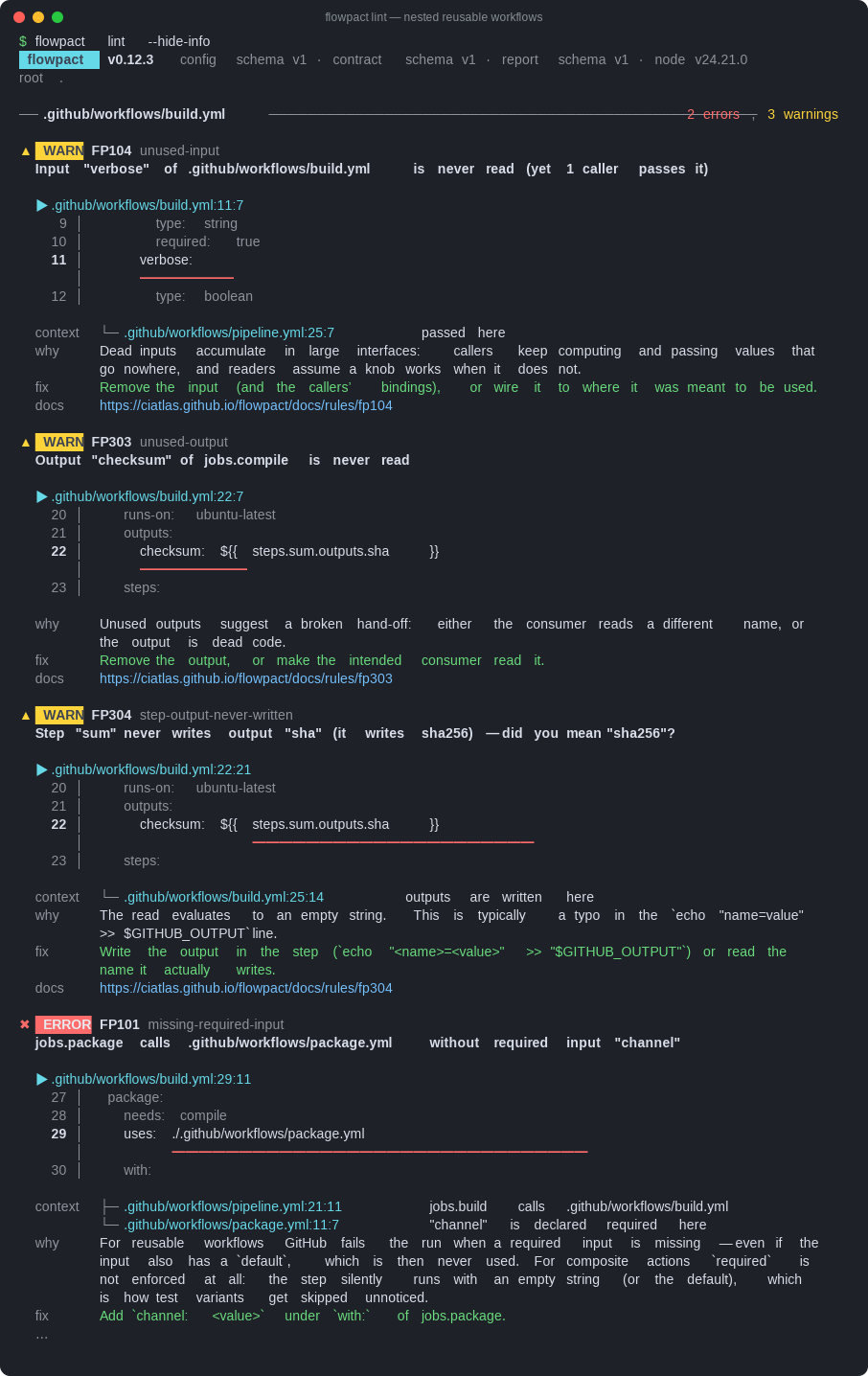
| Option | Description |
|---|---|
[paths…] | Files or directories to report on. Everything is still analyzed. With --impact, impact mode grades only the published workflows and actions within them (see flowpact impact). |
--root <dir> | Repository root (default: current directory). |
--config <file> | Config file (default: .github/flowpact/flowpact.config.yml). |
--base-config <file> | Defaults under the repository's config, such as an organization's, relative to the working directory. See Base config. |
--no-plugins | Do not load the plugins the config lists; they run code from the repository. |
--plugin <file> | Also load this plugin, relative to the working directory; repeatable, and not affected by --no-plugins. See organization rules. |
--format pretty|json|markdown|sarif|github | Output on stdout (default pretty). See output formats. |
-o, --output <file> | Also write the report to a file, replacing it; format by extension: .sarif / .sarif.json → SARIF, .json → JSON, .md → Markdown, anything else → plain text. Name the format for other names, as in -o markdown:"$GITHUB_STEP_SUMMARY". Repeat it to write several reports from one run. |
--fail-on error|warning|never | Exit 1 when findings at this level exist (default error), and unless never, when a version change that --fetch-remotes grades breaks a call. |
--only <codes> | Comma-separated codes or names to run, e.g. FP401,unused-input. |
--hide-info | Pretty terminal output only: do not list info findings (they are still counted). JSON, Markdown and SARIF always include them. |
--include-graph | Add the data-flow graph to JSON output and the call graph (Mermaid) to Markdown output. |
--dump-graph <file> | Write the data-flow graph as JSON (debugging). |
--no-schema | Skip validation against GitHub's workflow schema. |
--fetch-remotes | Fetch the interfaces of the remote workflows and actions the remote interfaces lockfile lacks, for this run only (nothing is written), with GH_TOKEN, GITHUB_TOKEN or the GitHub CLI's token. It says which API and token it uses and shows its progress on stderr, as remotes update does. A reference that cannot be fetched is a warning, followed by what to check. On a pull request in GitHub Actions, or with --base <ref>, it also grades the remote references the change moves to another version (On a pull request). |
--impact | Also check the release impact of the changes against the declared impact, with --base <ref>, --expect none|patch|minor|major, --title <text> and --labels <a,b>. See flowpact impact. |
-d, --debug | Debug logging (see below). |
-v / -vv | Verbose / trace logging. |
-q, --quiet | No banner or logs, only the report and errors. |
--no-color | Disable colors (also NO_COLOR=1). |
--ascii | ASCII-only symbols for limited terminals. |
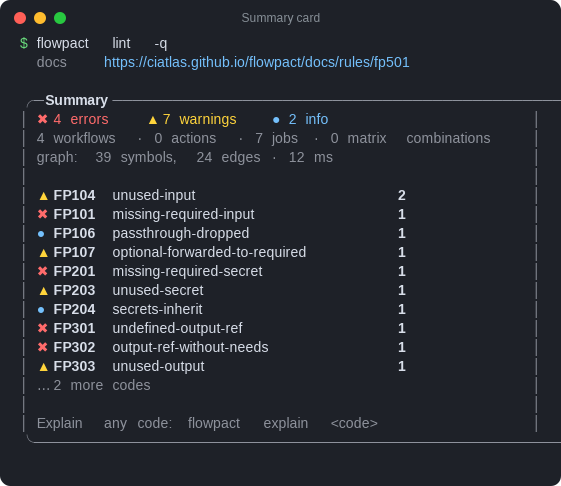
The summary card at the end:
Output formats
| Format | Use it for |
|---|---|
pretty | The terminal: code frames, call chains, matrix combinations and a summary card. |
json | Tooling. Follows /schemas/report/v1.json (below). |
markdown | Job summaries and pull request comments: counts, findings grouped by severity with docs links, and contract changes in flowpact check. Inside GitHub Actions, locations link to the file at the commit being checked. |
sarif | SARIF 2.1.0 for GitHub code scanning and other SARIF viewers. Findings accepted by overrides and ignore comments are left out (code scanning ignores SARIF suppressions); the JSON report lists them under suppressed and ignoredByComment. |
github | GitHub Actions: one workflow command per finding, which GitHub shows as an error, warning or notice annotation on the file and line, in the run and the pull request — the same annotations as the action. Stdout only. |
Inside GitHub Actions, when --root is a subdirectory of the repository, the paths in github annotations, SARIF and
the Markdown links are made relative to the repository (GITHUB_WORKSPACE), where GitHub resolves them.
flowpact lint -o flowpact-report.json           # JSON file + pretty output in the terminal
flowpact lint -o flowpact.sarif                 # SARIF file for code scanning
flowpact lint -o flowpact-report.md             # Markdown file, e.g. for $GITHUB_STEP_SUMMARY
flowpact lint -o flowpact-report.txt            # plain-text copy of the pretty report
flowpact lint --format json > report.json  # JSON only

# In GitHub Actions: annotations, the job summary and SARIF, from one run
flowpact lint --format github -o markdown:"$GITHUB_STEP_SUMMARY" -o flowpact.sarif
JSON report
The JSON report follows /schemas/report/v1.json:
{
  "$schema": "https://ciatlas.github.io/flowpact/schemas/report/v1.json",
  "meta": { "tool": "flowpact", "version": "0.29.2", "schemas": { "config": 1, "contract": 1, "report": 1 }, "node": "v24.4.0", "platform": "linux-x64", "root": "/home/runner/work/app/app", "durationMs": 31 },
  "summary": { "errors": 1, "warnings": 0, "infos": 0, "suppressed": 0, "ignoredByComment": 0, "byCode": { "FP401": 1 } },
  "findings": [
    {
      "code": "FP401",
      "name": "empty-binding-for-matrix-combo",
      "severity": "error",
      "message": "Input \"config\" for .github/workflows/run-suite.yml is empty in 1 of 3 matrix combinations — matrix.config is not defined there",
      "loc": { "file": ".github/workflows/tests.yml", "line": 23, "column": 19, "endLine": 23, "endColumn": 32 },
      "related": [{ "loc": { "file": ".github/workflows/tests.yml", "line": 18, "column": 13 }, "message": "this include entry has no `config`" }],
      "combos": ["{ name: windows }"],
      "symbol": ".github/workflows/run-suite.yml#inputs.config",
      "why": "…", "fix": "…",
      "docsUrl": "https://ciatlas.github.io/flowpact/docs/rules/fp401",
      "fingerprint": "3f2a9c0d81b7e645"
    }
  ],
  "suppressed": [],
  "ignoredByComment": [],
  "rules": [{ "code": "FP101", "name": "missing-required-input", "severity": "error" }, "…"]
}-
symbolidentifies what the finding is about; use it as thetargetof an override. -
suppressedlists findings accepted by overrides, each with anoverrideobject (index,reason,expires,owner); they are not part of the counts. -
ignoredByCommentlists findings accepted by ignore comments, each with acommentobject (loc, andreasonwhen the comment gives one); they are not part of the counts either. -
In
flowpact check,contractsholds the contract comparison:drift, the number ofbreakingchanges,countsper status and one entry per contract file with its status and semantic changes. -
fingerprintis stable across unrelated edits (line shifts, changed counts), so it can be used to track findings over time. -
suggestions, on some findings, are fixes flowpact can apply: each has atitleand theeditsthat make it, the text atlocreplaced bynewText. A rule suggests one only when the change is certain:- rename a misspelled input, secret, output or step id to the name its "did you mean" points at;
- add a missing required input or secret to a call (
with:,secrets:), or a missing key to the matrixincludeentries that lack it, with an empty value for you to fill in; - remove an unused input, and what local callers pass for it, from a workflow or action no other repository uses (not a published one, nor a dispatch input, whose callers flowpact cannot see).
Nothing is suggested in a flow mapping (
{ … }) or a file with CRLF line endings. The editor offers suggestions as quick fixes, and SARIF carries them asfixes."suggestions": [ { "title": "Rename \"confg\" to \"config\"", "edits": [{ "loc": { "file": ".github/workflows/ci.yml", "line": 6, "column": 7, "endLine": 6, "endColumn": 12 }, "newText": "config" }] } ] -
ruleslists every rule with its code, name and effective severity (offincluded). -
With
--impact(orflowpact impact),impactholds the verdict: thebaseline, therequiredanddeclaredimpact,ok, and every graded change. With paths,impact.scopelists thepathsand the publishedunitswithin them, the only ones graded;impact.ignoredlists the published unitsignoreleft out. See Impact mode.
flowpact check
Everything flowpact lint does, plus a comparison with the contracts committed in
.github/flowpact/.
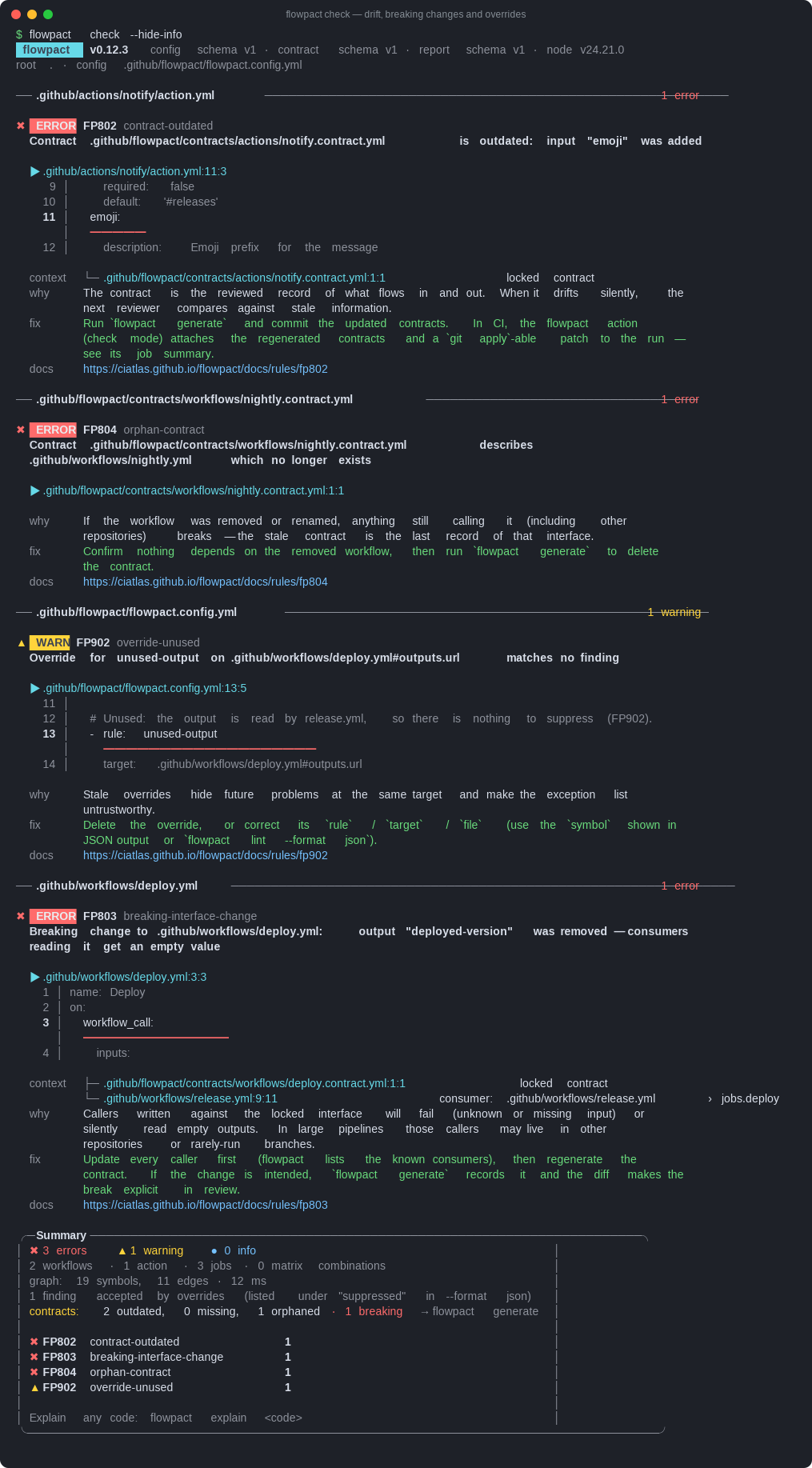
flowpact check [paths…] [options] [--patch <file>]It takes the same options as flowpact lint. Contract findings — missing (FP801), outdated (FP802), breaking
(FP803), orphaned (FP804) and invalid (FP805) contracts — are errors by default, so the command exits 1
until the contracts are regenerated.
With paths, the comparison covers the contracts of those workflows and actions, and the contracts that list them as
a consumer: a caller that stops passing an input or reading an output changes its callee's contract, so that drift
is reported too. The orphaned contract of a workflow or action that no longer exists is covered when its path lies
within the paths, such as actions/ for a removed actions/old (with --impact, the removed path itself counts).
| Option | Description |
|---|---|
--patch <file> | When contracts drifted, also write a git apply-able patch with the regenerated contracts. |
flowpact generate
Writes the contract for every workflow and local action, and deletes contracts whose workflow or action no longer exists.
flowpact generate [paths…] [--dry-run] [--patch <file>] [--out <dir>]| Option | Description |
|---|---|
[paths…] | Workflow or action files or directories: write only their contracts and the contracts that list them as a consumer, and delete the orphaned contracts of removed units within them (what flowpact check with the same paths compares). Other contracts are left alone. |
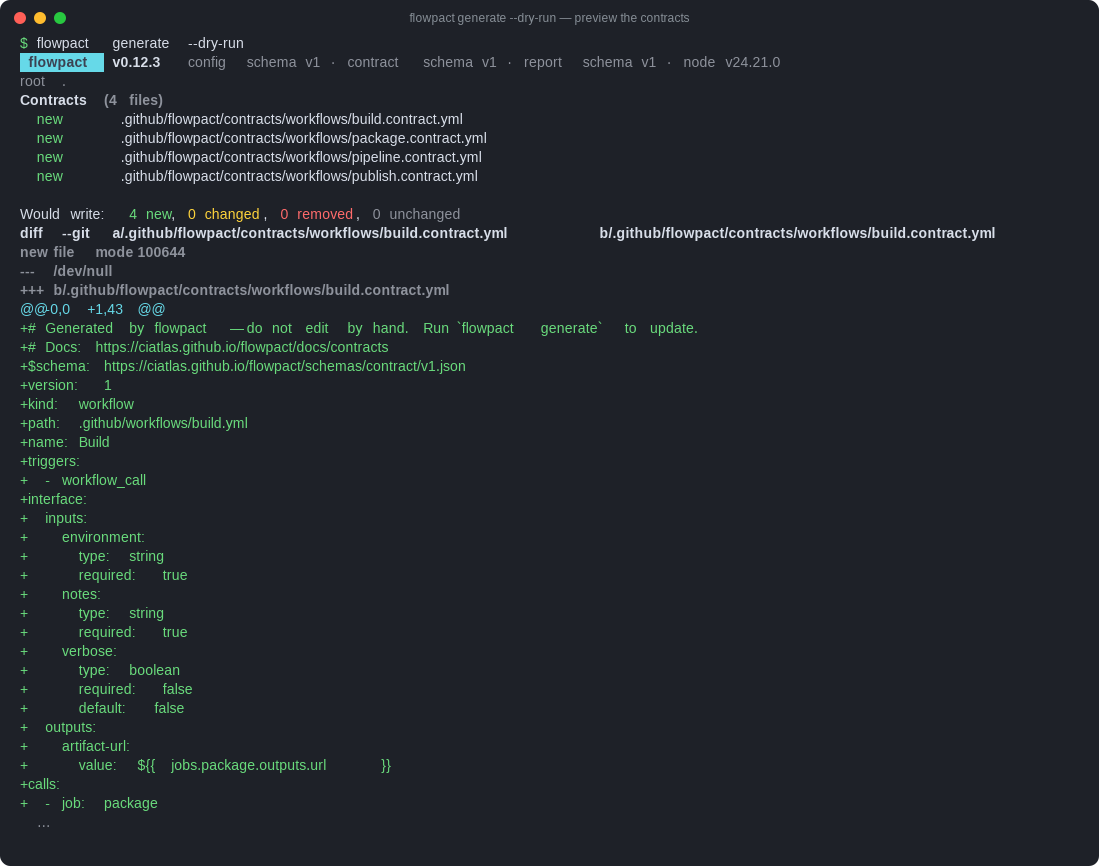
--dry-run | Print the table of changes and a colored unified diff; write nothing. |
--patch <file> | Write the changes as a git apply-able patch instead of applying them. |
--out <dir> | Write all contracts (changed or not) under <dir>, keeping their relative paths, instead of the repository. Nothing is deleted. |
It also accepts --root, --config, --base-config and the logging and color options. The table lists every contract file as new,
changed, removed or unchanged, with the semantic changes underneath; breaking changes are marked. Running it twice
in a row changes nothing.
flowpact remotes
The remote interfaces of the workflows and actions this repository calls from other
repositories: update writes the lockfile, download fills the sources cache from it for the editor, and clean
empties that cache.
flowpact remotes update
Fetches the interface of every remote reusable workflow and action the repository uses, and writes
.github/flowpact/remotes.lock.yaml (see Remote interfaces).
flowpact remotes update [paths…] [--cache-dir <dir> | --no-cache] [--dry-run] [--fail-on <verdict>] [--format json]| Option | Description |
|---|---|
[paths…] | Workflow or action files or directories: fetch only the remote references they use, and those of the local workflows and actions they call. Other entries of the lockfile are kept as they are; an entry nothing in the repository uses any more is still dropped. |
--github-com | On GitHub Enterprise Server or GHE.com: also look on github.com for the references the enterprise server lacks, as GitHub Connect does, with GITHUB_COM_TOKEN or none (never the enterprise token). See GitHub Enterprise Server. |
--cache-dir <dir> | flowpact's cache directory: keep the files read in its remotes directory (relative to where you run flowpact). Also in CI, where nothing is kept by default. |
--no-cache | Keep none of the files read; write only the lockfile. Not with --cache-dir. |
--dry-run | Fetch and say what would change; write nothing, not even to the cache. |
--fail-on <verdict> | Also exit 1 when a changed entry breaks a call of the repository (breaks), or breaks one or leaves part of one unchecked (unchecked). Default: never. See When a version changes. |
--format <format> | pretty (the default) or json: the result as remotesUpdate() returns it. remotes download and remotes clean take it too. |
It also accepts --root, --config and the logging and color options. Each reference is resolved to a commit
through the GitHub API, and its workflow file or action.yml is read at that commit. Entries of references nothing uses
any more are dropped. A reference that does not exist, or that the token cannot read, is listed as unread and, without
a previous entry, recorded under the lockfile's unreadable:, so FP612 counts it as accounted
for. Any other failure (the network, a timeout, an error from the API, a file over 1 MB) is listed as failed, keeps
the reference's previous entry, and makes the command exit 1.
A reference GitHub's actions.lock pins is read at the commit it pins,
not at the one its tag points to now; the output says how many were (.github/workflows/actions.lock: 2 references read at the commits it pins), or why that file is not used.
Each entry that changed (its reference moved to another commit, or its interface changed) is graded against every call of the reference in the repository, also with paths: under the reference, the output lists the interface changes and each call the change breaks or leaves partly unchecked, with why (see When a version changes).
The token is GH_TOKEN, else GITHUB_TOKEN, else the GitHub CLI's for the API's host (gh auth token --hostname);
the output names the source it used (token: GH_TOKEN), never the token, which is sent only to the GitHub API
(GITHUB_API_URL on GitHub Enterprise Server). Public repositories can be read without one, at GitHub's 60 requests an
hour for anonymous reads; private and internal ones need read access to their contents (fine-grained: Contents: read
on them; classic: repo). Before the first request it says on stderr which API it reads, and where the token came from
and what kind it is (or why there is none). In a terminal a spinner then shows the count, the time so far and any retry;
-d logs each reference instead, and -q shows neither. Each failure says why, and the output ends with what to check:
see Remote interfaces.
The files it reads go to the sources cache, for the editor; the
output names it (sources: ~/.cache/flowpact/remotes (2 new)). Files it cannot keep there are counted on that line,
with the first reason (-d logs each one), and do not fail the command. With --dry-run, nothing is kept. In CI
(CI set, or Azure Pipelines' TF_BUILD, or Jenkins' JENKINS_URL), nothing is kept unless --cache-dir or
FLOWPACT_CACHE_DIR says where: nobody opens the files there, and the line says so.
flowpact remotes download
Downloads the workflow files and action.ymls of the remote references the repository uses into the
sources cache, at the commits the lockfile pins, so the editor can
open them. It resolves no tag and does not change the lockfile.
flowpact remotes download [paths…] [--cache-dir <dir>] [--github-com]| Option | Description |
|---|---|
[paths…] | Workflow or action files or directories: download only the sources of the remote references they use, and those of the local workflows and actions they call. |
--cache-dir <dir> | flowpact's cache directory: download into its remotes directory (relative to where you run flowpact). |
--github-com | Download the sources of entries read on github.com (host: github.com), with GITHUB_COM_TOKEN or none; without it they are skipped. See GitHub Enterprise Server. |
It needs the lockfile (without one, or with one it cannot use, it exits 2), and the same token and GITHUB_API_URL
as flowpact remotes update. Unlike remotes update, it uses the cache in CI too: downloading is all it does.
A source the cache has is not downloaded again. A reference the lockfile has no entry for is listed as unlocked
(flowpact remotes update adds it), one it records as not readable as skipped. A source that cannot be downloaded or
kept is listed as failed, and makes the command exit 1.
Both commands then keep the 3 most recently used commits of each repository in the cache, and every one they used; the
output counts the older commits removed. See flowpact remotes clean to clean more.
flowpact remotes clean
Removes the commits kept in the sources cache.
flowpact remotes clean [--keep <n>] [--cache-dir <dir>]| Option | Description |
|---|---|
--keep <n> | Keep the n most recently used commits of each repository (used by remotes update or remotes download); without it, nothing is kept. |
--cache-dir <dir> | flowpact's cache directory, as for remotes update. |
It removes only the <host>/<owner>/<repo>/<sha> directories flowpact keeps there, then the directories they leave empty;
anything else in the directory stays. A commit it cannot remove is named in the output and makes it exit 1.
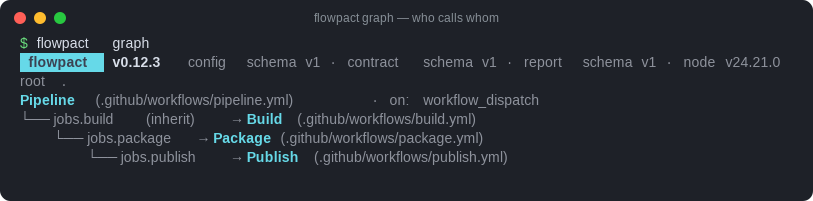
flowpact graph
Shows which workflows call which reusable workflows and local actions.
flowpact graph [paths…] [--format tree|mermaid|dot|json]With paths (workflow or action files, or directories), the graph starts from those workflows and actions and shows
only what they call and use, all the way down; every format draws the same part, and the JSON lists them as roots.
The tree starts at them even when one is in a cycle. Without paths, it shows the whole repository.
| Format | Output |
|---|---|
tree (default) | A tree per top-level workflow in the terminal. |
mermaid | A Mermaid flowchart, rendered by GitHub in Markdown files, issues and pull requests. |
dot | Graphviz DOT, e.g. flowpact graph --format dot | dot -Tsvg > graph.svg. |
json | Nodes and edges for tooling. |
Edges are labelled with the calling job (jobs.build, or the step for local actions), ×N when the call fans out over
N matrix combinations, and (inherit) for secrets: inherit. Reusable workflows in other repositories appear as
remote nodes, local targets that do not exist as missing nodes, and job-level calls to files outside
.github/workflows (FP606) as invalid location nodes.
flowpact trace
Shows where a value flows to, or with --up where it comes from.
flowpact trace <symbol> [--up] [--depth n] [--format pretty|json]Each symbol is expanded once per trace; where the same value is reached again through another path (for example
shared callees), the tree says ↑ shown above instead of repeating it. --format json always prints
{ "query", "direction", "traces": [...] }, however many symbols matched; for a workflow or action without inputs,
secrets or outputs, traces is empty and "unit" names it.
Symbols can be written in several ways:
| Query | Matches |
|---|---|
.github/workflows/ci.yml#inputs.env | exactly that symbol |
ci.yml#inputs.env | by file name |
ci.yml:env | inputs, secrets or outputs named env |
ci.yml | the whole interface of the workflow (every input, secret and output) |
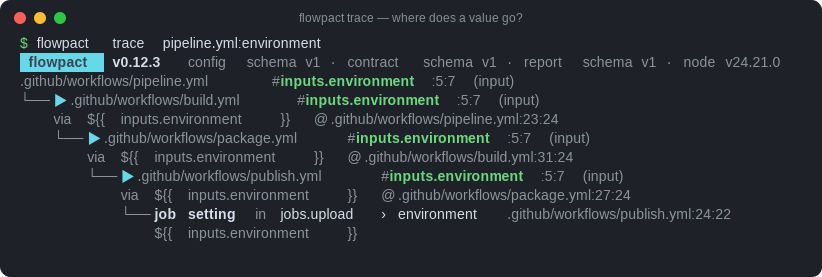
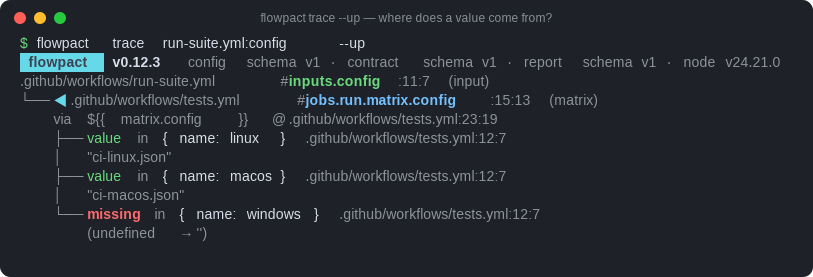
Under each branch, via shows how the value gets there: the expression it passes through, workflow output or
action output, or secrets: inherit. A note in parentheses qualifies it where that matters: (jobs.deploy) names the
job whose secrets: inherit passes a secret on, (exposed to the caller) marks an output of a reusable workflow or
action that becomes the output of the job or step that uses it, and (the default of inputs.<name>) and (when dispatched) are
described in Follow a value.
Upstream, each ◀ branch is a value the symbol is computed from, traced further up in turn. Where the trace ends, the
tree says what it ends at:
| Leaf | The value comes from |
|---|---|
literal | a plain value: what a caller or a step passes, an env variable's or output's own value, or the input's default: when a caller or step omits the input |
omitted | nothing: a caller or step does not pass the input (the default: GitHub then uses, if any, is listed too) |
value, missing, dynamic | a matrix key: its value in each combination, a combination that does not define it, or a matrix computed at runtime |
context | a context flowpact does not follow: github.event.pull_request.title, runner.os, needs.<job>.result, steps.<id>.outcome, or an env variable set at runtime ($GITHUB_ENV). A value read from the step's own env: is followed to what that entry reads. |
invalid | an expression that does not parse (FP502 reports it), or, in an input's default:, a context or function GitHub does not allow there |
expression | an expression that reads no context, such as format('v{0}', 1) |
How a trace reads inputs' defaults, the inputs of a workflow that is also dispatched, and whole objects such as
toJSON(inputs), with examples: Follow a value.
flowpact impact
For publishers of reusable workflows and actions: checks that the release impact a pull request declares covers the changes to published units since its base. See Impact mode.
flowpact impact [paths…] --base origin/main --title "fix: tidy the test job"It runs only the impact rules (FP810–FP814), so its exit code reflects only the verdict. flowpact lint --impact
and flowpact check --impact add the verdict to everything else they report. Options: --base, --expect,
--title, --labels and the output options of lint.
With paths (workflow or action files, or directories), impact mode grades only the published workflows and actions
within them, and the verdict is about those alone: the paths narrow the gate, so a change to a published unit
outside them is not checked. A path the pull request removed counts when the baseline has a workflow or action there,
whether it is given relative to --root or to the working directory.
The same holds for lint --impact and check --impact with paths. See Impact mode.
flowpact explain
flowpact explain FP401
flowpact explain empty-binding-for-matrix-combo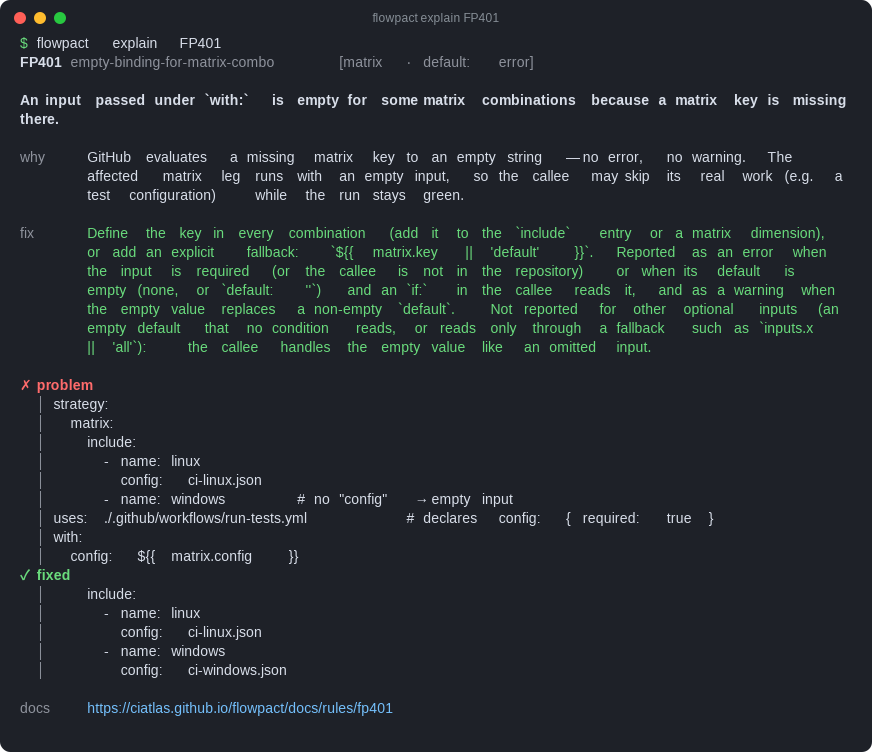
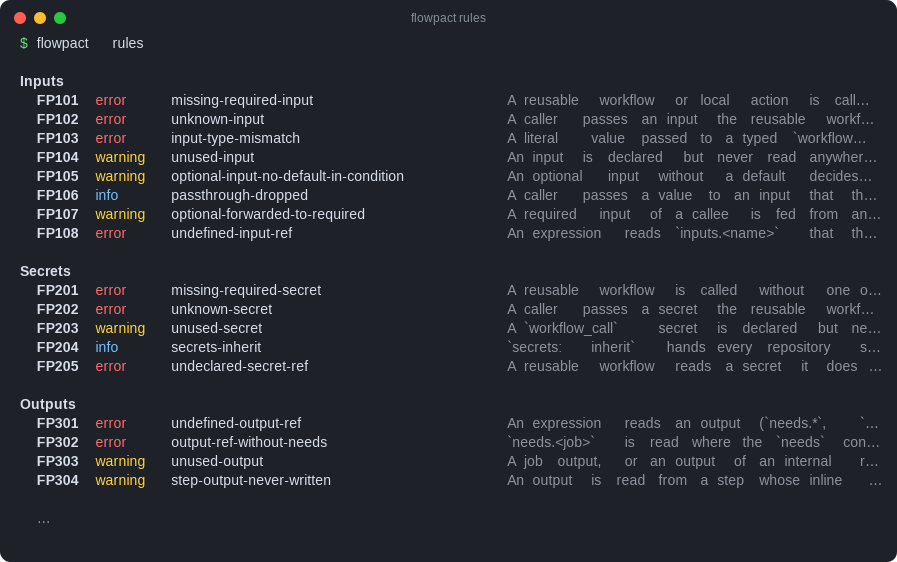
flowpact rules
Lists every built-in rule with its effective severity (after your config). --format json for tooling.
flowpact lsp
Starts the language server, which speaks the Language Server Protocol over stdin/stdout (--node-ipc and
--socket <port> are also accepted). Editors start it themselves; you do not run it by hand. It serves diagnostics as
you type, hover traces, go to definition across workflow calls, and references. See Editors for its
settings and how to set it up in Neovim and other editors; the VS Code extension bundles it.
Debug mode and logging
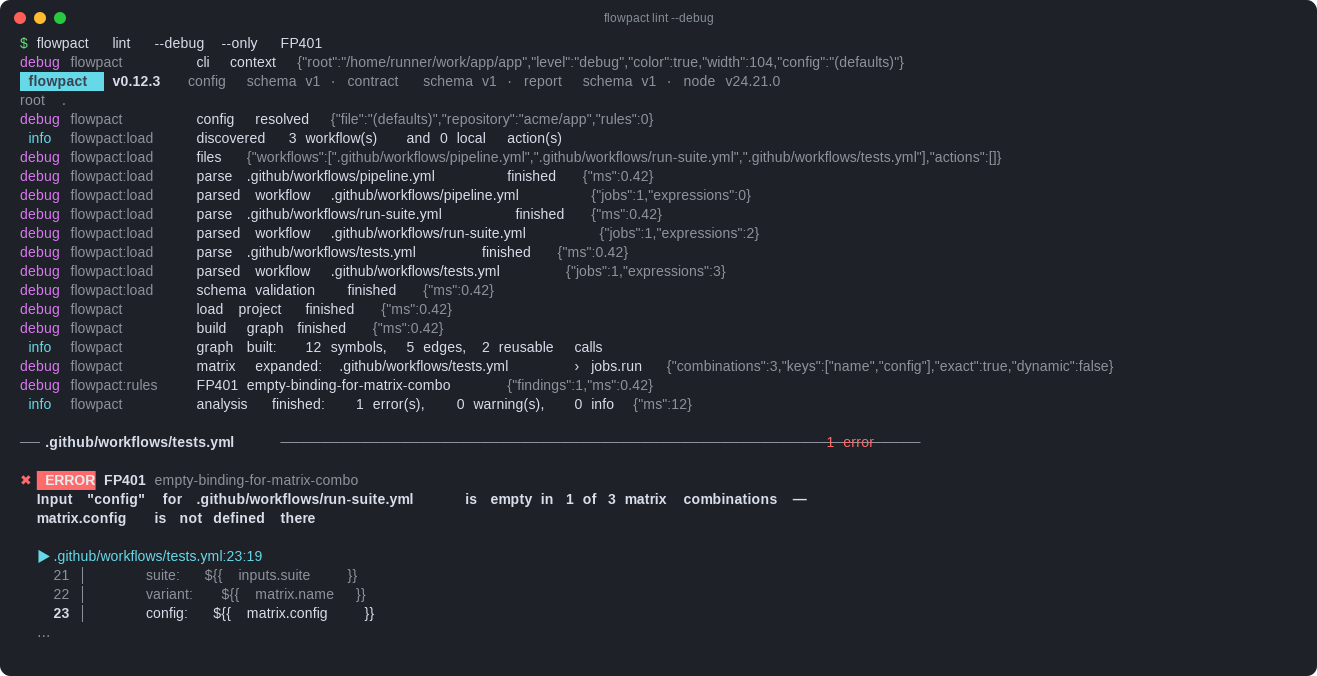
flowpact logs every stage of the analysis: config resolution, file discovery, parsing per file, graph construction, matrix expansion per job (combinations, keys, exactness), each rule with its finding count and timing, and the final summary.
| Enable with | Level |
|---|---|
--debug, -d, -v, FLOWPACT_DEBUG=1 | debug |
-vv, FLOWPACT_DEBUG=trace | trace (adds per-file timings and skipped rules) |
RUNNER_DEBUG=1, ACTIONS_STEP_DEBUG=true | debug — set automatically when you re-run a GitHub job with debug logging |
Logs go to stderr, so --format json output stays parseable.
Exit codes
| Code | Meaning |
|---|---|
0 | No findings at or above --fail-on (default: error). |
1 | Findings at or above --fail-on — including contract findings in flowpact check. |
2 | Usage or configuration error (unknown rule, invalid config, plugin that fails to load, nothing to analyze). |
3 | Internal error — please report it with --debug output. |
flowpact graph, flowpact trace, flowpact explain and flowpact rules exit 0 on success. flowpact generate
exits 0 too, or 1 when a file with YAML syntax errors could not be regenerated (its committed contract is kept).
Environment variables
| Variable | Effect |
|---|---|
NO_COLOR / FORCE_COLOR | Disable / force colors. |
FLOWPACT_DEBUG | 1 for debug logs, trace for trace logs. |
FLOWPACT_NO_HYPERLINKS | Disable clickable docs links (OSC 8). |
GITHUB_REPOSITORY | owner/repo, used to resolve same-repository uses: references (also read from .git/config or the repository config key). |
GH_TOKEN / GITHUB_TOKEN | The token flowpact remotes update, remotes download and --fetch-remotes read remote repositories with (else gh auth token). |
GITHUB_API_URL | The GitHub API flowpact remotes update, remotes download and --fetch-remotes use (https://<host>/api/v3 on GitHub Enterprise Server); https://api.github.com by default. |
GITHUB_COM_TOKEN | With --github-com, the token for github.com; without it, github.com is read without one. |
FLOWPACT_CACHE_DIR | An absolute path: keep the sources cache in its remotes directory instead of the platform's per-user cache, also in CI. --cache-dir takes precedence. |
CI / TF_BUILD / JENKINS_URL | Set by CI services: flowpact remotes update keeps no sources unless --cache-dir or FLOWPACT_CACHE_DIR says where. |
COLUMNS | Output width when not attached to a terminal. |