Remote interfaces
Check what your workflows pass to, and read from, reusable workflows and actions in other repositories, from a lockfile of their interfaces.
A call into another repository (uses: octo/ship/.github/workflows/deploy.yml@v1, uses: octo/setup@v2) is taken on
trust: nothing checks that the inputs you pass exist, have the right type, or include the required ones
(FP603 says so for remote workflows).
A remote interfaces lockfile records each one's inputs, secrets and outputs, and the permissions a reusable workflow's jobs request, at the commit its reference resolved to.
Interfaces, not pins
The lockfile records what each reference accepts and returns, so flowpact can check your calls. It does not decide
which commit runs: pin references to commit SHAs, or, for actions, use GitHub's
actions.lock, which flowpact reads.
With it, flowpact checks remote calls as it checks local ones:
FP101: a required input is not passed;FP102: an input the workflow or action does not declare is passed;FP103: a literal of the wrong type is passed to abooleanornumberinput;FP201: a required secret is not passed to a reusable workflow;FP202: a secret it does not declare is passed;FP205: a reusable workflow reads a secret it does not declare, and your call does not usesecrets: inherit, so the secret is empty;FP301: an output it does not declare is read. Only a composite action's outputs are checked: a JavaScript or Docker action may set others;FP613: a job of a reusable workflow requests aGITHUB_TOKENpermission your call does not grant, so GitHub refuses the run when it starts.
flowpact remotes update records them as undeclaredSecrets: only reads that run on every call. A read under an
if: (on its step, its job, or a job its job needs) or in a condition is left out, since a caller's inputs, event or
environment may switch it off. Not followed: a secret the remote workflow hands on with its own secrets: inherit, and
inherit from a workflow of yours that was itself given secrets by name.
flowpact remotes update records each job's own permissions: as jobPermissions, and the workflow's as
permissions when a job has none of its own. A job of the remote workflow that calls another workflow without
permissions hands on what it is granted to jobs flowpact does not read, so those are not checked. An entry written by
flowpact 0.25 or earlier records neither until the next remotes update.
What a remote workflow does with what it gets is not checked: its jobs are in another repository, so
FP203, FP204 and FP106 stay quiet about it.
Findings point at your call. Nothing is fetched during a run, so results do not depend on the network.
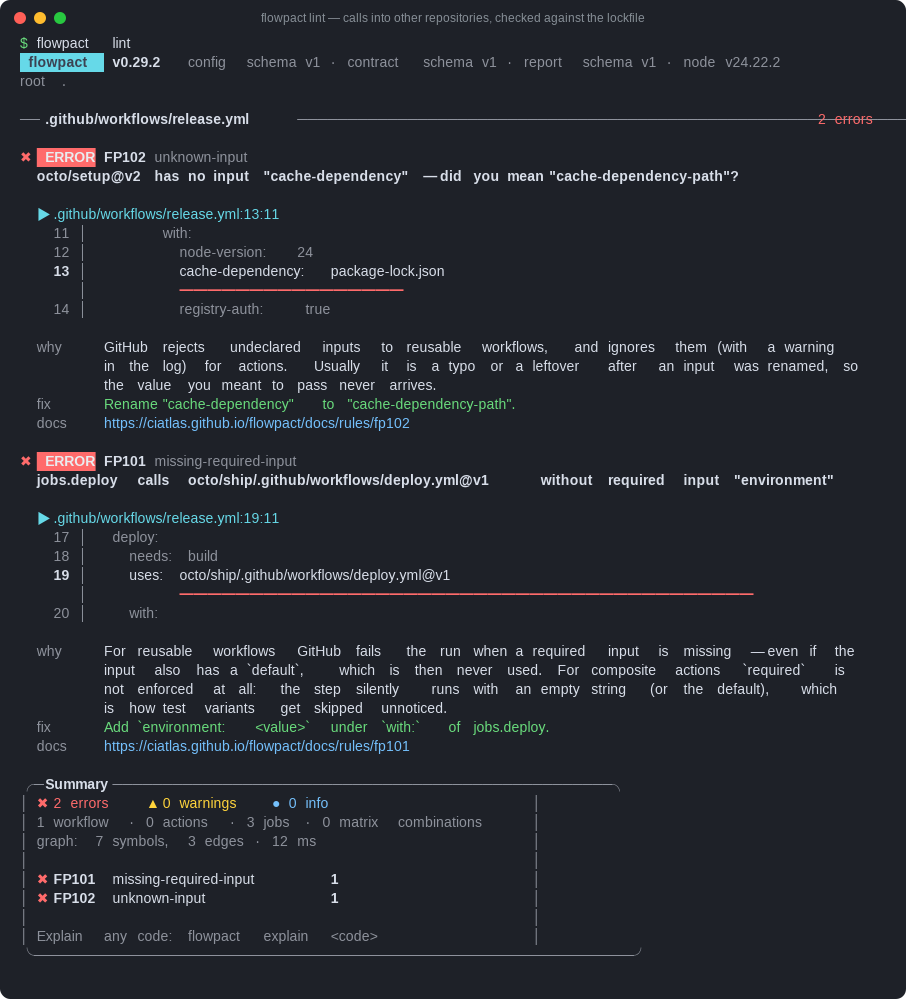
In the editor, hovering a remote uses: value, or a key a remote call passes, shows the
interface the lockfile records.
Writing it
flowpact remotes update                                   # every remote reference
flowpact remotes update .github/workflows/release.yml     # only what release.yml (and what it calls) uses
flowpact remotes update resolves each remote reference to a commit, reads its
workflow file or action.yml there through the GitHub API, and writes the lockfile. Commit it. Run it again when you
move a reference to another version, or on a schedule to notice a tag that moved: it says what each changed entry does
to your calls (When a version changes).
It also keeps the files it reads in your sources cache, for the editor. -v logs a line per
reference, with its commit or why it was not fetched. From a program, use
remotesUpdate().
Which token
| Token | Read from |
|---|---|
GH_TOKEN | first, when set |
GITHUB_TOKEN | when GH_TOKEN is not set |
the GitHub CLI's (gh auth token --hostname <host>) | when neither is set, for the API's host |
| none | public repositories only, at GitHub's 60 requests an hour for anonymous reads |
Before fetching, flowpact says which API it reads and which token it uses, never the token itself:
GitHub API: https://api.github.com (github.com: GITHUB_API_URL is not set)
token: `gh auth token --hostname github.com`, an OAuth token (GH_TOKEN and GITHUB_TOKEN are not set)
The token goes only to the GitHub API (GITHUB_API_URL on GitHub Enterprise Server). Public repositories need no permission. Private and internal ones need read access to
their contents: a fine-grained token with Contents: read, a classic token with repo, or a GitHub App installation
token that includes them.
When a reference is not fetched
| Message | What to do |
|---|---|
not found, or not readable with this token | The reference does not exist, or the token cannot read it. It is recorded under unreadable:; give a token that can read it to check it. |
the GitHub API rejected the token (401) | The token is invalid or expired, or for another host: check GH_TOKEN or GITHUB_TOKEN, or run gh auth status. |
the GitHub API asks for a token (401) | The API reads nothing without a token, as a GitHub Enterprise Server in private mode: set GH_TOKEN, or run gh auth login --hostname <host>. |
the GitHub API rate limit is used up | Without a token GitHub allows 60 requests an hour: set a token, or wait. |
the GitHub API asks to slow down | GitHub's secondary rate limit, for many requests at once: try again when it says. |
the GitHub API refused the request (403) | The token lacks read access to that repository's contents. |
could not reach https://api.github.com (…) | Node's fetch failed: no network, DNS, TLS or a proxy. Check GITHUB_API_URL; behind a proxy, set HTTPS_PROXY with NODE_USE_ENV_PROXY=1 (Node 24 and later), as Node's fetch ignores proxy variables otherwise. |
no answer from … within 30 s | The network or the API is slow: try again. |
flowpact retries after no answer, a server error (5xx) or the secondary rate limit, three times at most and backing off (as long as the rate limit asks, up to a minute), and says why while it waits. Once a request cannot reach a host (no connection, or no answer) after its three attempts, the references left to read there fail at once, so an unreachable API costs one wait, not one per reference. It asks once more for a commit or file the API says is not there, which it now and then says of one it has. An invalid token, missing access and a used-up rate limit are not retried.
When references cannot be fetched, the output ends with what to check: one hint per cause. When the API or the token may
be the wrong one, it adds where to point flowpact. When GITHUB_API_URL is not set and the repository's origin is on
another host, the hint names that host's API:
what to check:
  • some references are not on github.com, or not readable: this repository's origin is on
    gh.example.com: if that is a GitHub Enterprise Server or GHE.com, set
    GITHUB_API_URL=https://gh.example.com/api/v3; private and internal repositories need a token
    that can read their contents
  where flowpact reads remote repositories, and with which token:
    github.com                GITHUB_API_URL not set                         token: GH_TOKEN, else `gh auth login`
    GitHub Enterprise Server  GITHUB_API_URL=https://gh.example.com/api/v3   token: GH_TOKEN, else `gh auth login --hostname gh.example.com`
    GHE.com                   GITHUB_API_URL=https://api.<name>.ghe.com      token: GH_TOKEN, else `gh auth login --hostname <name>.ghe.com`
Sources for the editor
The lockfile holds interfaces only. The files they come from go to a cache outside the repository, so the
editor can open them. flowpact remotes update keeps every file it reads there, and
flowpact remotes download fills it for a lockfile someone else wrote, say after a git pull:
flowpact remotes download                                 # every remote reference the lockfile pins
flowpact remotes download .github/workflows/release.yml   # only what release.yml (and what it calls) uses
flowpact remotes download reads each file at the commit the lockfile pins, so
the editor shows the version the checks used. It resolves no tag, changes nothing in the lockfile, skips what the cache
has, and needs the same token.
| Platform | Cache |
|---|---|
| Linux and others | $XDG_CACHE_HOME/flowpact/remotes, or ~/.cache/flowpact/remotes |
| macOS | ~/Library/Caches/flowpact/remotes |
| Windows | %LOCALAPPDATA%\flowpact\Cache\remotes |
--cache-dir <dir> (relative to where you run flowpact) or FLOWPACT_CACHE_DIR (an absolute path) moves it to
<dir>/remotes; point your editor at the same place (Editors). Files are kept read-only, by
host, repository and commit (github.com/octo/ship/<sha>/.github/workflows/deploy.yml), as served. A file at a commit
never changes, so nothing goes stale, one cache serves every repository on the machine, and you can delete any of it at
any time.
Older flowpact releases kept the files without the host (octo/ship/<sha>/…). flowpact no longer reads, prunes or
cleans those directories: delete them, or the whole remotes directory, and run flowpact remotes download to fill the
cache again.
After remotes update and remotes download, each repository in the cache keeps its 3 most recently used commits,
and every commit the run used. The cache also stays under 128 MiB: past that, the least recently used commits go first,
never one the run used. flowpact remotes clean empties the cache, and flowpact remotes clean --keep 2 keeps 2 per
repository. Cleaning removes only the <host>/<owner>/<repo>/<sha> directories flowpact keeps, nothing else.
Files of private and internal repositories land there too, readable by your user only: flowpact creates the cache's
files and directories for you alone, wherever it is. A reference whose path could not be a file name on every platform
(.., a character Windows rejects), or on a host given with a port, is not cached.
Nobody opens the files in CI, so remotes update keeps none there unless --cache-dir or FLOWPACT_CACHE_DIR says
where; the output says it kept none. CI is detected from CI (set by GitHub Actions, GitLab, CircleCI and most
others), Azure Pipelines' TF_BUILD or Jenkins' JENKINS_URL. remotes update --no-cache keeps none anywhere. The
action, --fetch-remotes and --dry-run never write the cache. Without a home directory and without either option,
remotes update keeps nothing and remotes download stops with a usage error.
GitHub Enterprise Server and GHE.com
flowpact reads every remote reference from one API: GITHUB_API_URL, else https://api.github.com. It does not guess
the host from the references.
- In CI, the runner sets
GITHUB_API_URL(https://<host>/api/v3on GitHub Enterprise Server,https://api.<subdomain>.ghe.comon GHE.com), so the action reads from your enterprise withtoken. - On your machine, set it yourself:
export GITHUB_API_URL=https://<host>/api/v3. The token isGH_TOKEN,GITHUB_TOKEN, or the GitHub CLI's for that host (gh auth login --hostname <host>). AGH_TOKENleft over from github.com comes first, and the server rejects it: unset it, or set it to a token from the server.
Actions from github.com. With GitHub Connect, a runner of GitHub Enterprise Server looks for an action on the
enterprise server first, then on github.com. flowpact asks only the enterprise server unless you opt in, so an action
the runner takes from github.com is recorded under unreadable:. To look on github.com too:
flowpact remotes update --github-com # GITHUB_COM_TOKEN for github.com, or none- uses: ciatlas/flowpact@v0.29
with:
remotes: fetch
remotes-github-com: true
github-com-token: ${{ secrets.GITHUB_COM_TOKEN }} # optional; public repositories need noneEntries read there are marked host: github.com. The enterprise token is never sent to github.com:
GITHUB_COM_TOKEN (the action's github-com-token) is, or none. It is opt-in because it sends github.com the names of
the references your enterprise server lacks, misspelled or deleted internal ones included.
In CI
The action and the CLI read the committed lockfile and nothing else. To also check references it lacks, fetch them for the run. Nothing is written back, and the lockfile's own entries stand.
- uses: ciatlas/flowpact@v0.29
  with:
    remotes: fetch            # token defaults to github.token
On the command line, flowpact lint --fetch-remotes (or check) does the same with the token above. A
reference that cannot be fetched is a warning and stays unchecked. github.token reads public repositories; private
and internal ones need a token that can read them, such as a GitHub App installation token from
actions/create-github-app-token with their names under repositories:.
The action does not fetch on pull_request_target or workflow_run. There the workflows come from an untrusted pull
request while the token may be privileged, so the pull request would choose which repositories the token reads.
FP612 warns when the lockfile lacks a reference the repository uses or has one nothing uses,
even when the run fetched it: run flowpact remotes update and commit it. It also reports an entry for a reference
pinned to a full commit SHA that records another commit. Such an entry was edited by hand and describes other code than
what runs, so calls are not checked against it.
When a version changes
A tag moves, or you move a reference to another version, and the new interface may drop an input you pass, make one
required, or stop declaring an output you read. flowpact remotes update grades each changed entry against every call
of its reference, before you commit the new lockfile (with --dry-run, before it writes anything):
would write .github/flowpact/remotes.lock.yaml
token: GH_TOKEN
  changed actions/setup-node@v6: 2028fbc → 395ad32, breaks 1 of 3 calls
    input "always-auth" was removed — steps that pass it get a warning, and their value is ignored
    breaks .github/workflows/release.yml:21 jobs.publish step #2
      FP102 actions/setup-node@v6 has no input "always-auth"
    2 other calls fit
That one is real: setup-node 6.1.0 dropped always-auth, and @v6 moved to it. Each call gets a verdict:
| Verdict | Meaning |
|---|---|
| breaks | A check fails with the new interface that passed with the old one. The lines under it are what flowpact check reports once the lockfile is updated. |
| not fully checked | No check fails, but part of the change is out of the checks' reach for this call; the line under it says which. |
| fits | Every check passes as before. Only the calls that do not simply fit are listed. |
The verdict comes from the rules above (FP101 to FP103, FP201, FP202, FP205, FP301 and FP613), run with the entry before and after. Problems a call already had do not count. A call is not fully checked when it:
- passes an expression to an input the new version declares as
booleanornumber: only literals are checked (FP103); - uses
secrets: inherit, and the new version needs a secret the old one did not: whether you have it is not known; - reads an output a JavaScript or Docker action no longer declares, which it can still set;
- sets no
permissions:(nor does its workflow, or every workflow that calls it), and the new version requests a permission at a higher level: whether the repository's default token permissions allow it is not known.
A call that leaves out an input whose default changed gets a note: it runs with the new default. A runtime change
(runs.using, such as node20 to node24) is listed under the reference. The grade is about the interface, not the
behaviour: read the release notes of a major version.
A scheduled drift check
To hear about a moved tag before a run fails, check on a schedule. --fail-on breaks fails the job when a changed entry
breaks a call; --fail-on unchecked also when it leaves part of one unchecked:
name: Remote interfaces drift
on:
  schedule:
    - cron: '0 6 * * 1'
  workflow_dispatch:
permissions:
  contents: read
jobs:
  drift:
    runs-on: ubuntu-latest
    steps:
      - uses: actions/checkout@v7                       # pin to a commit SHA
        with:
          persist-credentials: false
      - run: npx --yes flowpact@0.29 remotes update --dry-run --fail-on breaks
        env:
          GH_TOKEN: ${{ github.token }}
When a tag the lockfile records has moved to a commit that drops an input your workflow passes, the job fails with:
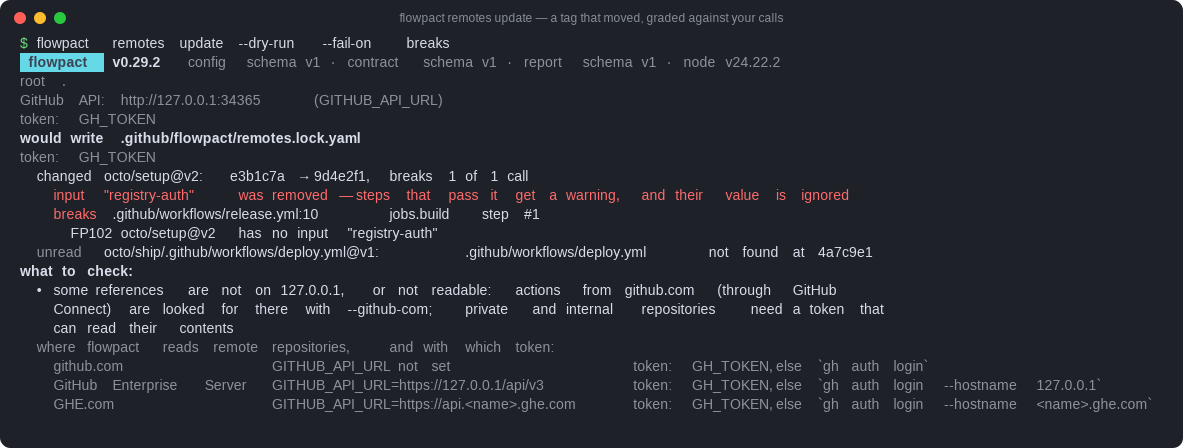
Private and internal repositories need a token that can read them (Which token). With
--format json, a script gets the same as JSON: grades has one entry per changed reference, with its verdict, the
interface changes and its calls. remotesUpdate()
returns the same.
On a pull request
With remotes: fetch, the action also grades the references a pull request moves to another version
(octo/setup@v2 → @v3) and adds a Version changes section to the job summary. The interface before is the base
commit's; the one after is always fetched, never read from the pull request's own lockfile, which could hide a break.
A version change that breaks a call fails the step (unless fail-on is never), and the version-verdict output says
breaks, unchecked or fits.
flowpact lint --fetch-remotes (or check) does the same on a pull request in GitHub Actions, or with --base <ref>,
whose commit must be in the clone. It prints the grades after the report, or on stderr when the report is json,
sarif or github, and exits 1 when one breaks a call, unless --fail-on never:
version changes from 5ea36fb: 1 call broken
  octo/setup@v3 (from octo/setup@v2): 3f2a9c1 → 9d4e2f1, breaks 1 of 1 call
    input "version" was removed — steps that pass it get a warning, and their value is ignored
    input "node-version" was added and must be passed — existing callers do not pass it
    breaks .github/workflows/ci.yml:6 jobs.b step #1
      FP101 Step #1 uses octo/setup@v3 without required input "node-version" — GitHub will run it with an empty value
      FP102 octo/setup@v3 has no input "version"
Neither grades on pull_request_target or workflow_run. For your own action,
lint() and check() return the grades with fetchRemotes.
Renovate and Dependabot
When Renovate or Dependabot moves a reference to another version (octo/setup@v2 → @v3), the lockfile still has
@v2. Until it is updated, @v3 is checked only by a run that fetches it, and FP612 says the
lockfile is out of date.
Gate the bump. With remotes: fetch in your flowpact job, the bot's pull request is
graded: the step fails when @v3 breaks one of your calls, even when the pull request updates
the lockfile too. Make the job a required status check, and Renovate's automerge and GitHub's auto-merge for
Dependabot wait for it:
on: pull_request
permissions:
  contents: read
jobs:
  flowpact:
    runs-on: ubuntu-latest
    steps:
      - uses: actions/checkout@v7                       # pin to a commit SHA
        with:
          persist-credentials: false
      - uses: ciatlas/flowpact@v0.29                    # pin to a commit SHA
        with:
          remotes: fetch
Keep the lockfile current in the bot's pull request, or update it after the merge (FP612 reminds you until then):
Allow the command in the bot's admin config, not in renovate.json (allowedCommands: ["^npx --yes flowpact@"],
formerly allowedPostUpgradeCommands), and give it a token that can read the remote repositories through the
environment Renovate runs commands in (for example customEnvVariables):
{
  "postUpgradeTasks": {
    "commands": ["npx --yes flowpact@0.29 remotes update"],
    "fileFilters": [".github/flowpact/remotes.lock.yaml"],
    "executionMode": "branch"
  }
}They run no commands of yours, so a workflow on their pull requests runs the update and pushes the lockfile to their
branch. Push with a GitHub App token: pushes with github.token start no workflow runs, so the checks would not run
again on the new commit. Dependabot's runs get a read-only token and only Dependabot secrets, so store the app's key as
a Dependabot secret.
name: Remote interfaces lockfile
on:
  pull_request:
    paths: ['.github/workflows/**', '**/action.yml', '**/action.yaml']
permissions: {}
jobs:
  update:
    if: contains(fromJSON('["renovate[bot]", "dependabot[bot]"]'), github.event.pull_request.user.login)
    runs-on: ubuntu-latest
    steps:
      - id: app
        uses: actions/create-github-app-token@v3       # pin to a commit SHA
        with:
          client-id: ${{ vars.LOCK_BOT_CLIENT_ID }}
          private-key: ${{ secrets.LOCK_BOT_PRIVATE_KEY }}
      - uses: actions/checkout@v7                       # pin to a commit SHA
        with:
          ref: ${{ github.head_ref }}
          token: ${{ steps.app.outputs.token }}
          persist-credentials: true
      - run: npx --yes flowpact@0.29 remotes update
        env:
          GH_TOKEN: ${{ steps.app.outputs.token }}
      - run: |
          git diff --quiet -- .github/flowpact/remotes.lock.yaml && exit 0
          git config user.name 'remotes-lock[bot]'
          git config user.email 'remotes-lock[bot]@users.noreply.github.com'
          git commit -m 'chore: update the remote interfaces lockfile' -- .github/flowpact/remotes.lock.yaml
          git push
The job runs only for the bots' pull requests, checks out their branch (never a fork's: bots push to your repository),
and runs flowpact from npm, not code from the pull request.
GitHub's actions.lock
GitHub's workflow dependency lockfile,
.github/workflows/actions.lock (written by gh actions-lock and Dependabot; Renovate's support is experimental),
pins the commit each action owner/repo@ref runs in the workflows it covers: a tag such as @v4 keeps running that
commit after it moves. The two files do different jobs:
.github/workflows/actions.lock | .github/flowpact/remotes.lock.yaml | |
|---|---|---|
| Written by | gh actions-lock, Dependabot, Renovate (experimental) | flowpact remotes update |
| Records | the commit each action runs, and who owns it | each reference's inputs, secrets and outputs at a commit |
| Used by | the runner, which runs that commit and checks it | flowpact, which checks your calls against the interface |
flowpact reads actions.lock and never writes or verifies it: run gh actions-lock --verify in CI for that.
remotes update, --fetch-remotes, the action's remotes: fetch and the pull request grading
read each action it pins at the pinned commit, not where its tag points now, and remotes update says how many it read
that way. When flowpact's lockfile records another commit, FP612 reports it: the bot that
updated actions.lock left remotes.lock.yaml as it was, so run flowpact remotes update.
- Only the workflows
actions.locklists are covered. An action used by a covered and an uncovered workflow is read at the pinned commit. - An action with a path (
actions/cache/restore@v4) is pinned by its repository's key (actions/cache@v4), asgh actions-lockwrites it. - GitHub does not lock reusable workflow calls (
jobs.<id>.uses, gh-actions-lock#179), so flowpact reads them where their ref points now, even when an action of the same repository and ref is pinned. Pin them to a commit SHA to choose what runs. - Onboarding a workflow with
gh actions-lockcan rewrite its references (@v4to@v4.2.1, or a SHA to its tag): runflowpact remotes updateafter it, or FP612 reports the new references. - The schema is before 1.0: flowpact reads versions
v0.0.x, v0.0.1's keys included. Another version, or a file that does not parse, is not used:FP614reports it, andremotes updatesays why. Itshostnameis not read.
The lockfile
.github/flowpact/remotes.lock.yaml (or remotes.lock.yml), one entry per uses: reference:
version: 1
remotes:
  octo/ship/.github/workflows/deploy.yml@v1:
    sha: 4e6c5f0b9a1d2e3f4a5b6c7d8e9f0a1b2c3d4e5f   # the commit v1 resolved to
    kind: workflow
    inputs:
      env: { type: string, required: true }
      dry-run: { type: boolean, default: false }
    secrets:
      token: { required: true }
    outputs: [url]
    undeclaredSecrets: [NPM_TOKEN]   # read without being declared: only secrets: inherit gives it
    permissions: { contents: read }  # the workflow's, for its jobs without their own
    jobPermissions:
      release: { contents: write }   # a job's own
  octo/setup@v2:
    sha: 9f8e7d6c5b4a39281706f5e4d3c2b1a098765432
    kind: action
    using: composite        # runs.using; outputs are checked only for composite
    inputs:
      version: { required: true }
    outputs: [path]
Two versions of one action (octo/setup@v1 in one job, @v2 in another) are two entries, and each call is checked
against its own. A reference that flowpact remotes update cannot read (it does not exist, or the token cannot read
it) is recorded under unreadable:, with why. It is not checked, but the lockfile accounts for it, so
FP612 does not report it:
unreadable:
  vercel/gh-sts-action@c30f0b7a16e0766c4ffbc0d210b54d0e75053fd2: not found, or not readable with this token
The owner and repository of a reference match in any letter case, the path and the ref as written. A reference the
lockfile does not have stays unchecked. A lockfile that does not parse or does not match this shape is reported by
FP611, and then no remote call is checked.
Impact mode
For publishers of reusable workflows and actions — check that the release impact a pull request declares covers what its changes require, so consumers never get a breaking change as a patch.
Roll it out across an organization
Run flowpact under your organization's policies (a copy of the action, a plain run step, your own action or a wrapper) with organization defaults and rules, and keep the version current.